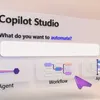
Build Automated Agents, Workflows, and Apps - New in Copilot Studio
Take a business process from prompt to production by building agents, workflows, and apps in one place with Copilot Studio. Describe the agent you need and generate its instructions and reusable skills, choose the model, connect MCP tools and specialist agents, then test its quality at scale with Evaluations. Trigger workflows from incoming email, classify submissions, hand work to your agents, and pause for human review on the decisions that need it. Track timing and paths for every step in the Activity tab. Then generate a full stack app on your Dataverse data so your team can filter, review, and approve every bid from one shared view. Jack Rowbotham, Copilot Studio Senior Product Manager, shares how to automate a procurement process for bids from multiple vendors, using agents that reason, route, and recommend. 👥 Who it's for: IT admins, Power Platform makers, solution architects, and developers building agentic solutions, plus operations and procurement teams automating reviews and approvals. ⏱️ Chapters: 00:00 Build agents, workflows, and apps in one place 01:04 Automate a multi-vendor bid review end to end 02:18 Build an agent from a prompt 03:28 Add models, MCP tools, and specialist agents 04:13 Test the bid agent in Preview 05:05 Evaluations 05:59 Automated workflows 07:42 Track every run in the Activity tab 08:13 Build an app from a prompt 09:10 Approve bids from the team app <a class= "ytAttributedStringLink ytAttributedStringLinkCallToActionColor" tabindex="0" href= "htt
Podzilla Summary coming soon
Sign up to get notified when the full AI-powered summary is ready.
Free forever for up to 3 podcasts. No credit card required.
Listen to This Episode
More from Microsoft Mechanics Podcast
Create agents fast with Agent Builder in Copilot

New Agent 365 controls for Microsoft admins

Windows 365: Five Years In, See What's New
Build your first Power App from data in seconds
Get summaries like this every morning.
Free AI-powered recaps of Microsoft Mechanics Podcast and your other favorite podcasts, delivered to your inbox.
Free forever for up to 3 podcasts. No credit card required.